 GHADIMI FINANCE
Risk-based lot size
Four modes: % of balance, % of equity, fixed amount or fixed lot — with a lot cap and automatic size reduction when margin runs short.
A MetaTrader 5 money-management Expert Advisor that sizes every position from your risk and stop loss, automatically takes trades to break-even and closes them in steps, locks your account on a bad day — and then grades your money management.
Ordinary EAs either trade on their own or just hand you a lot size. Money Manager Pro sits beside you, warns you before every mistake, manages the trade, and after every day and every month gives you a report card and guidance. The decision to enter is always yours.
It calculates your lot size precisely and shows the dollar loss before you click. If a rule isn't met — the daily loss cap, the trade count or a wide spread — it blocks the entry and tells you why.
In profit, it closes part of the position and takes the trade to break-even, trails the stop behind price and watches your daily loss and account drawdown in real time. When you hit a limit, it locks the account or just warns you — your choice — on your phone too.
It logs every trade in the journal and calendar, grades your money management from A+ to F and tells you which habit to fix first, which hours and days cost you money, and what risk suits your current results.
Most money-management tools only calculate the lot size. Money Manager Pro covers the whole cycle: before entry, during the trade and after the close.
| Typical lot calculator | Money Manager Pro | |
|---|---|---|
| Lot size from risk | ✓ | ✓ + four risk modes and margin control |
| SL, TP and loss amount shown before entry | Usually not | ✓ |
| Partial TPs, break-even, trailing | No | ✓ Automatic |
| Daily loss limit, daily target, drawdown | No | ✓ With three lock modes |
| P/L journal and calendar | No | ✓ Inside the panel |
| Grading and personal recommendations | No | ✓ A+ to F |
| HTML report with charts | No | ✓ |
The EA doesn't give signals; it executes and manages the trade you choose, by your rules.
Four modes: % of balance, % of equity, fixed amount or fixed lot — with a lot cap and automatic size reduction when margin runs short.
Stop loss by ATR or points; take profit by R:R, points or none. Both the price and the dollar amount are shown before you click.
The TRADE LINES button puts SL and TP lines on the chart; drag them and lot size and risk update live. PENDING mode adds an ENTRY line for pending orders.
Close part of the position at TP1 and TP2 in R, automatic break-even, and trailing by points, ATR or highs and lows.
Daily loss limit, daily target, overall or daily drawdown, trade and position caps, spread and session filters. You choose LOCK / WARN ONLY / OFF.
Break-even all, close 50%, close winners or losers, delete pending orders and close all — with confirmation for sensitive actions.
A monthly trading calendar: daily and weekly P/L, green and red days, and each day's trades in one click. A trade list with R and CSV export.
Eight metrics, a grade from A+ to F, prioritized recommendations and suggested settings, plus a full HTML report with charts and a calendar.
Drag the panel anywhere on the chart by its title bar, or snap it left or right in one click; its position is saved. Dark, light and pink themes, collapse to a single bar, and sizing for any display.
MetaTrader alerts and push notifications to your phone on a lock or protection warning; sounds when orders execute.
Forex, gold, indices and your broker's crypto; P/L is calculated by the broker's own server. Manage just this EA's trades, the whole symbol or the entire account.
Your key is tied to your account number and is verified without an internet connection. Backtesting in the Strategy Tester is free, no key needed.
Tap a tab to see what it does.
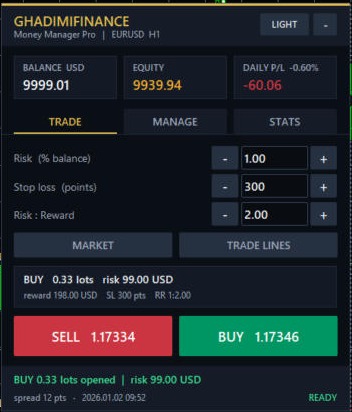
The images for these two tabs are simplified mock-ups, not screenshots.
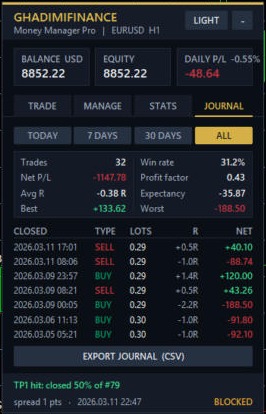
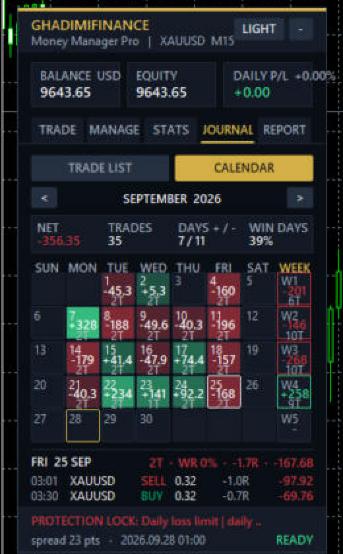
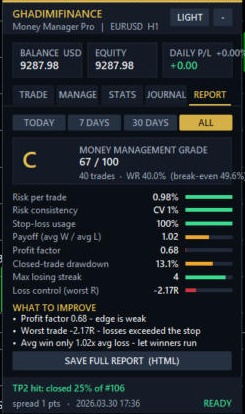
Images come from running the EA in the Strategy Tester and are not the results of a trading strategy.
The REPORT tab reads all of your closed trades, measures eight metrics, scores you out of 100 and — like a coach — tells you which mistake to fix first and which settings suit your current results. Ranges: today, 7 days, 30 days and full history.
| Metric | Weight | Full score | Zero score |
|---|---|---|---|
| Risk per tradeAverage risk as a % of the balance | 20 | 1% or less | 3% or more |
| Risk consistencyHow much risk size varies between trades | 10 | 15% variation | 80% variation |
| Stop-loss usageShare of trades with an SL | 15 | Every trade | None |
| Win/loss ratioAverage win ÷ average loss | 15 | 2× | Zero |
| Profit FactorGross profit ÷ gross loss | 15 | 2 or more | 0.8 |
| DrawdownLargest closed-trade drawdown | 15 | 5% | 25% |
| Longest losing streak | 5 | 3 losses | 10 losses |
| Loss controlWorst trade in R | 5 | -1.1R | -2.5R |
Between these two limits each metric's score moves linearly, and their weighted sum gives the overall score out of 100.
Professional money management; keep these rules and focus on execution quality.
Professional level.
A solid foundation; fix the highlighted points to reach an A.
Average; the account survives, but these same flaws are costing you money. Start with the first two.
Weak; fix your risk control before increasing your size.
Critical; cut your risk right now and review your strategy.
Ten losses in a row — normal for any strategy — would wipe out about 22% of the account. Bring your risk down to 1%.
A single trade without a stop loss can erase weeks of profit. Set your stop loss before you enter; the panel sizes the position from it.
Your average win is 1.2× your average loss; at that ratio you need a 45% win rate just to break even. Either aim for a bigger reward or be stricter with your entries.
Decide in advance that after 3 losses you stop trading for the day. The max trades per day and max daily loss inputs do this for you automatically.
Trades closed around this hour lost money overall. Exclude this hour with the time filter.
Strengths are listed separately too, so you know what not to change.
Based on your actual Profit Factor and drawdown, it works out a suggested risk per trade (0.25% to 1%), a daily loss limit and a maximum number of trades per day. For example, if your PF is below 1, it lowers risk to 0.25%.
Your most costly and most profitable hours, your weakest day of the week, whether your buys win while your sells lose (or vice versa), overtrading, and losses bigger than your stop because of gaps or news.
In one click: your grade and the eight metrics, a monthly calendar of daily results, an equity growth chart, P/L by hour, the full list of recommendations and strengths, and a table of suggested settings. Save it or send it to your mentor.
A reliable result needs at least 30 closed trades; below 10 trades the grade is only a first impression, and the report says so. The EA builds the grade from your own trades and does not guarantee future profits.
Enter your MetaTrader account number and email, then pay through the rial gateway or with cryptocurrency.
As soon as payment is confirmed, a key made for your account is generated, shown on screen and emailed to you.
Drag the EA onto a chart and paste the key into the License Key field. Renewing is just as simple.
Every plan includes every feature — just pick the length. The 12-month plan works out to $2 a month. Toman prices follow the daily dollar rate. Renewals are added on top of your current subscription, so you never lose remaining days. Backtesting in the Strategy Tester is free, no key required.
Lost your key? Enter the account number and email you purchased with.
Can't find your answer here? — it can even check your license key on the spot.
No. Entries are up to you: the EA calculates the lot size, sets the SL and TP, manages the trade and protects your account. Only in the Strategy Tester does it place test entries, for demonstration.
Each key is tied to a single account number (live or demo). For another account, buy a separate subscription or ask support for a transfer.
The EA stops running and, if it's on a chart, removes itself. Open trades are left untouched. Five days before expiry, the panel shows a renewal reminder.
Any broker that offers MetaTrader 5. The value of each point is read from the broker's own server, so it's accurate for forex, gold and indices.
Yes. Download the EA file and run it in the Strategy Tester without a key.
On the live site, your key is issued and emailed like this right after payment:
This is a preview; no payment was made.